M-A's

technology blog

Thursday, 15 November 2012

Unicode equivalence may not be handled as you think

Unicode normalization is not always happening how you would expect, especially w.r.t. file systems. First, I recommend you to read about it on the wikipedia page http://en.wikipedia.org/wiki/Unicode_equivalence that is fairly well written:
In general, the code points of truly identical characters (which can be rendered in the same way in Unicode fonts) are defined to be canonically equivalent.
Unicode has 2 equivalence notions, with pre-composed or decomposed representing the same characters, and 2 normal forms, the canonical one (NF) and the "compatible" one (NFK).
In order to compare or search Unicode strings, software can use either composed or decomposed forms; this choice does not matter as long as it is the same for all strings involved in a search, comparison, etc. On the other hand, the choice of equivalence criteria can affect search results. For instance some typographic ligatures like U+FB03 (ffi), roman numerals like U+2168 (Ⅸ) and even subscripts and superscripts, e.g. U+2075 (⁵) have their own Unicode code points. Canonical normalization (NF) does not affect any of these, but compatibility normalization (NFK) will decompose the ffi ligature into the constituent letters, so a search for U+0066 (f) as substring would succeed in an NFKC normalization of U+FB03 but not in NFC normalization of U+FB03. Likewise when searching for the Latin letter I (U+0049) in the precomposed Roman Numeral Ⅸ (U+2168). Similarly the superscript "⁵" (U+2075) is transformed to "5" (U+0035) by compatibility mapping.
I found out while writing an universal file tracer for the Chromium project. [Spoiler alert]: The gory details are buried in trace_inputs.py. Note that the code in trace_inputs.py also does case normalization, which a subject in itself, maybe for another post.

I wasn't sure about each OS behaviour with regard to file path handling so I wrote a small python script to figure out what is happening exactly. I pasted the script's code at the bottom of this post. I'll let you guess what happens on each of the following OS: OSX 10.8, Ubuntu 12.04 with LANG=foo.UTF-8 and Windows 7. The analysis is under the eye of if NF or NFK is employed when trying to open a file. I'm explicitly excluding case normalization (a vs A) for this post.

Ubuntu

Let's start with Ubuntu, which behaved exactly as I imagined. Note that I'm using LANG=foo.UTF-8:
~/src/foo> ./unicode_is_hard.py
e-acute-circumflex
Found 2 different encodings for u'\u1ebf'
  NFKC: u'\u1ebf'
   NFD: u'e\u0302\u0301'
   NFC: u'\u1ebf'
  NFKD: u'e\u0302\u0301'
  OS returned: u'NFC\u1ebf', u'NFDe\u0302\u0301', u'NFKC\u1ebf', u'NFKDe\u0302\u0301'

roman_numeral_one
Found 2 different encodings for u'\u2160'
  NFKC: u'I'
   NFD: u'\u2160'
   NFC: u'\u2160'
  NFKD: u'I'
  OS returned: u'NFC\u2160', u'NFD\u2160', u'NFKCI', u'NFKDI'

e-acute-circumflex + roman_numeral_one
Found 4 different encodings for u'\u1ebf\u2160'
  NFKC: u'\u1ebfI'
   NFD: u'e\u0302\u0301\u2160'
   NFC: u'\u1ebf\u2160'
  NFKD: u'e\u0302\u0301I'
  OS returned: u'NFC\u1ebf\u2160', u'NFDe\u0302\u0301\u2160', u'NFKC\u1ebfI', u'NFKDe\u0302\u0301I'
How Nautilus displays the files
As you can see, the file system is not processing the Unicode characters at all so what you write is what you get. Now I'll let you guess what happens on OSX and Windows. Prepare your bets.

Windows

Windows is interesting because it didn't behave as I expected.
D:\src>python unicode_is_hard.py
e-acute-circumflex
Found 2 different encodings for u'\u1ebf'
  NFKC: u'\u1ebf'
   NFD: u'e\u0302\u0301'
   NFC: u'\u1ebf'
  NFKD: u'e\u0302\u0301'
  OS returned: u'NFC\u1ebf', u'NFDe\u0302\u0301', u'NFKC\u1ebf', u'NFKDe\u0302\u0301'

roman_numeral_one
Found 2 different encodings for u'\u2160'
  NFKC: u'I'
   NFD: u'\u2160'
   NFC: u'\u2160'
  NFKD: u'I'
  OS returned: u'NFC\u2160', u'NFD\u2160', u'NFKCI', u'NFKDI'

e-acute-circumflex + roman_numeral_one
Found 4 different encodings for u'\u1ebf\u2160'
  NFKC: u'\u1ebfI'
   NFD: u'e\u0302\u0301\u2160'
   NFC: u'\u1ebf\u2160'
  NFKD: u'e\u0302\u0301I'
  OS returned: u'NFC\u1ebf\u2160', u'NFDe\u0302\u0301\u2160', u'NFKC\u1ebfI', u'NFKDe\u0302\u0301I'

How Windows Explorer displays the files
As you can see, and that was unexpected to me, Windows doesn't normalize the unicode code points to NFK so you will get whatever the program used like for Ubuntu. As a spoiler, cygwin is doing the same but I left its output for brevity. Note how the rendering is significantly different for \u2160 (I) unlike Ubuntu's default rendering in Unity.

OSX

If you already played with unicode code point normalization and had to touch OSX, you problaby know why I kept it as the last one:
~/src/foo> ./unicode_is_hard.py
e-acute-circumflex
Found 2 different encodings for u'\u1ebf'
  NFKC: u'\u1ebf'
   NFD: u'e\u0302\u0301'
   NFC: u'\u1ebf'
  NFKD: u'e\u0302\u0301'
  OS returned: u'NFCe\u0302\u0301', u'NFDe\u0302\u0301', u'NFKCe\u0302\u0301', u'NFKDe\u0302\u0301'
  2 are not matching.
  For  NFC, expected  NFC, NFKC but could with  NFC,  NFD, NFKC, NFKD
  For NFKC, expected  NFC, NFKC but could with  NFC,  NFD, NFKC, NFKD
  For  NFD, expected  NFD, NFKD but could with  NFC,  NFD, NFKC, NFKD
  For NFKD, expected  NFD, NFKD but could with  NFC,  NFD, NFKC, NFKD

roman_numeral_one
Found 2 different encodings for u'\u2160'
  NFKC: u'I'
   NFD: u'\u2160'
   NFC: u'\u2160'
  NFKD: u'I'
  OS returned: u'NFC\u2160', u'NFD\u2160', u'NFKCI', u'NFKDI'

e-acute-circumflex + roman_numeral_one
Found 4 different encodings for u'\u1ebf\u2160'
  NFKC: u'\u1ebfI'
   NFD: u'e\u0302\u0301\u2160'
   NFC: u'\u1ebf\u2160'
  NFKD: u'e\u0302\u0301I'
  OS returned: u'NFCe\u0302\u0301\u2160', u'NFDe\u0302\u0301\u2160', u'NFKCe\u0302\u0301I', u'NFKDe\u0302\u0301I'
  2 are not matching.
  For  NFC, expected  NFC but could with  NFC,  NFD
  For NFKC, expected NFKC but could with NFKC, NFKD
  For  NFD, expected  NFD but could with  NFC,  NFD
  For NFKD, expected NFKD but could with NFKC, NFKD
How Finder displays the files
As you can see, OSX is the only OS to normalize Unicode code points. But it is doing partial normalization, only for NFD vs NFC but not for NFKx vs NFx. That's interesting as I'd have expected NFK handling instead. So a file written in NFKx cannot be opened in NFx but NFC vs NFD is transparently converted.

The code

#!/usr/bin/env python
# Copyright (c) 2012 Marc-Antoine Ruel. All rights reserved.

"""This scripts create a subdirectory named unicode_is_hard which contains
various files in various encoding.

See http://en.wikipedia.org/wiki/Unicode_equivalence for the various UTF
encodings.
"""

import os
import shutil
import sys
import unicodedata

BASE_DIR = os.path.dirname(os.path.abspath(__file__))

def try_with_string(work_dir, unicode_string):
  """Encodes an unicode string with 4 different encodings and tries to open the
  file with the other encodings.
  """
  # Delete the work directory if present.
  if os.path.isdir(work_dir):
    shutil.rmtree(work_dir)
  os.mkdir(work_dir)

  encodings = (u'NFC', u'NFKC', u'NFD', u'NFKD')
  encoded = dict(
      (key, unicodedata.normalize(key, unicode_string)) for key in encodings)
  filenames = dict((key, key + value) for key, value in encoded.iteritems())

  # This implicitly assumes python does the right thing here.
  different_encodings = len(set(encoded.itervalues()))
  print(
      'Found %d different encodings for %r' %
      (different_encodings, unicode_string))
  for encoding, value in encoded.iteritems():
    print('  %4s: %r' % (encoding, value))

  # Now for each type, create a file. See if the other encodings can open it.
  for filename in filenames.itervalues():
    open(os.path.join(work_dir, filename), 'w').close()

  files_found = sorted(os.listdir(work_dir))
  print('  OS returned: %s' % ', '.join(repr(i) for i in files_found))
  not_matching = set(filenames.itervalues()).difference(files_found)
  if not_matching:
    print('  %d are not matching.' % len(not_matching))

  expected = {}
  for encoding, value in encoded.iteritems():
    # Assumes comparison in python is correctly done.
    for encoding_to_confirm, value_to_confirm in encoded.iteritems():
      if value_to_confirm == value:
        expected.setdefault(encoding, []).append(encoding_to_confirm)

  # Now do the 16 combinations to try to open each files with the other
  # encoding.
  actual = {}
  for encoding, original_filename in filenames.iteritems():
    for encoding_to_try, value_to_try in encoded.iteritems():
      # Try to open the file with the other encoding.
      try:
        open(os.path.join(work_dir, encoding + value_to_try)).close()
        actual.setdefault(encoding, []).append(encoding_to_try)
      except IOError:
        pass

  # Print if anything unexpected succeeded. This happens in the case
  # encoded[encoding1] != encoded[encoding2] but they could open each other.
  for encoding in encodings:
    if sorted(expected[encoding]) != sorted(actual[encoding]):
      print(
          '  For %4s, expected %s but could with %s' % (
            encoding,
            ', '.join('%4s' % i for i in sorted(expected[encoding])),
            ', '.join('%4s' % i for i in sorted(actual[encoding]))))

def main():
  work_dir = os.path.join(unicode(BASE_DIR), u'unicode_is_hard')

  # Examples taken from the Wikipedia page and unicodedata python stdlib doc.
  # http://docs.python.org/2/library/unicodedata.html
  e_acute_circumflex = u'\u1ebf'
  roman_numeral_one = u'\u2160'

  print('e-acute-circumflex')
  try_with_string(work_dir, e_acute_circumflex)

  print('\nroman_numeral_one')
  try_with_string(work_dir, roman_numeral_one)

  print('\ne-acute-circumflex + roman_numeral_one')
  try_with_string(work_dir, e_acute_circumflex + roman_numeral_one)
  return 0

if __name__ == '__main__':
  sys.exit(main())

Friday, 12 October 2012

Short 10 items work-efficiency recipe

Here's a repost of a message I wrote internally at Google. I had been asked about how to be more efficient, or put another way, how to generate that much code. To get an idea, you can look at the data there;
http://svnsearch.org/svnsearch/repos/CHROMIUM/search?view=plot&author=maruel%40chromium.org. In that time frame, I also contributed to buildbot, Rietveld, and worked on Google-internal projects.

So here's my short 10 items work-efficiency recipe;

1. Always keep the same work schedule as much as possible

But work when your brain is in flux state. If you wake up a noon and get to bed at 3am everyday, keep it always the same. When you're 25yr old it's fine to be less stable in your work schedule. You'll get old eventually, if you survive yourself, and eventually, your body will hate what you do to it. Work on weekend if needed but keeping a stable schedule is important for maximal brain efficiency. Continue coding up to the exact moment as soon as you see yourself unsure of the design for your next line to write, stop coding at that point.

2. Do small changes

Other committers have probably larger diffstat than me but the CLs are more complicated so harder to read. I try to make small CLs because it's:
  • Easier to glance at to figure out what's it's doing.
  • Much easier to review, reducing turn around time -> enable review over email -> improve your own efficiency.
  • Easier to revert with less chance of merge error.
  • When doing small changes, it's possible to TBR= the patches more often. TBR in this context means to be reviewed.

3. Learn to cope with review latency

When doing small changes, you can pipeline them to reduce the effect of review latency. You can cheat sometimes with TBR but not abuse too much. Working on 2 projects concurrently helps a lot. I often start with a large change then split it up into smaller CLs. This always improve the quality of the code.

4. Take time to pay technical debt

Probably worth keeping aside 20% of your coding time to technical debt;
  • Adding tests. In spring 2011, I took 3 months writing unit tests for depot_tools. It was really depressing but it really helped afterward.
  • Refactoring poor designs. It's good to accumulate technical debt since it's often after the fact that you can really see the best design. Do not try to design too much up front, unless you're designing an API!
Often people are afraid to refactor because of the cost of doing so. Planing is the key. Split in sub tasks;
  1. Identify consumers.
  2. Identify problem and how a new interface would fix the problem.
  3. Evaluate the cost/benefit of a refactor. Think about intangibles, would it reduce the learning curve of a potential new contributor?
  4. Create the new interface.
  5. Write tests for the new interface.
  6. Alert everyone.
  7. Switch consumer to new interface.
  8. Wait for propagation delay.
  9. Remove old interface.
It applies mostly everywhere. It requires being methodic. But sometimes, give up, the refactor is not worth it! A refactor for the fun of refactoring is skipping the "Identify problem" step. See next item.

5. Focus on your user's benefit

Do not focus code or just yet-another-feature. It's not the number of commits or the diffstat, it's stuff that works that count. Do not fix problems for old code, do not be afraid to deprecate cleanly. Work on complex problems! Fix a complex problem with many simple solutions by splitting the problem in parts so as much existing components can be reused. Work most of the time on non-visible grungy stuff but occasionally work on highly visible projects otherwise you'll get no recognition.

6. Fix repetition with code

Kill idle time with code. Take the time to automate anything you see yourself doing 3 times. Write one-liner scripts and put them in a SCM. Separate your public scripts from the private ones. For example, this permits putting the public one on github.

7. Write the code to be refactorable in the first place

This is in general overlooked by new grads but it is extremely important. Someone will be stuck with the code you wrote 4 years from now and will hate you and will wonder why you did it this way. So at least, make it easy for them to refactor it.

That's why I always align the function call arguments at +4 on the following line, so that a single argument addition is a single-line diff that is very easy to revert or merge with other commits. Never align at "(", otherwise at the moment you are renaming the function, you have to realign all the call sites!

Another example is to use style check or static analysis.

8. Abuse to some extent the "test on prod" mentality

To be able to achieve that, you have to:
  • Write code defensively. Especially with python, springle asserts generously.
  • Plan for failure. If everything breaks, what is the cascading effect? Plan for cascading failure. For example, a gclient sync [The chromium meta checkout tool] breakage could DDoS the subversion server, then provision accordinly.
  • Have breakage not be too important -> do many incremental changes instead of big ones.
  • Make sure it's easy to revert fast (small CLs).
  • Have some sort of monitoring. Devs yelling at you is a form of monitoring. Otherwise, it's time to pay technical debt. I abuse 'devs monitoring' a bit. Try to do without pissing off your colleagues too much.
  • Unit tests are great. You need test. But you need integration (smoke) tests too. Are your mocks representative of the actual implementation? If the component you rely on working with your use case?

9. Optimize your work environment

  • Have your text editor be efficient. I personally use vim exclusively even if I do not consider myself a power-user. Spend an inordinate amount of time configuring it. Try a few before settling in.
  • Use the CLI all the time.
  • Try to never touch the mouse. But still use an high quality mouse.
  • Use an high quality keyboard. Grab a keyboard where the F-keys are near the numbers row if you use F-keys. Millimeters count.
  • Take time to learn how to use your SCM and review tool. As an example in Chromium-land, commands like "git cl comments" help boost your productivity.
  • Not using GUI makes it easier to effectively use any wait time I may have; grab laptop, fire up an ssh window and screen -x exactly where I had left up. Setup ssh keys to reduce wait time. That's to help with #1.
  • Do not be lazy. Use the best tools available. There are awesome engineers in the world produce new tools that could be of use for you, use their output. So the list of tools is different from last year's; be prepared for change. For example, "If you are not using ninja to build Chromium, You are compiling it wrong(tm)". Do not accept status-quo for toolsets.

10. Optimize your meta-work environment

  • Do not get distracted. Social events are great. Visit other offices if you work in a multi-office environment. Meeting colleagues face to face is extremely important to build trust relationships. Otherwise, join meets-up to learn about how other companies solve common problems. But most of your time should be spent coding if you are a SWE.
  • Communicate asynchronously as much as possible. But when it's time for coordination, communicate synchronously. VC/IM/F2F.
  • Do not be shy. You are not paid to be shy. It doesn't mean to be a jerk, just not be afraid to ask questions. Be prepared to receive RTFM as answer.
  • Do not meta-work. Gmail filter out as much as possible. Force yourself to use keyboard shortcuts in Gmail. Do not spend as much time on G+ as I do. :) Meetings are meta-work. Meta-work is your #1 enemy.
  • Reduce communication overhead as much as possible. Use broadcast instead of 1:1 to spread information. Use mailing lists instead of direct email addresses for easier searchability and archival.
  • If you do not like working with someone, do not work with the person. Do not let management overhead kill your productivity.

Friday, 15 July 2011

Want to rent a movie tonight? Can you calculate how much it'll cost you?

Or how many movies can you rent on iTunes in a month?

For demonstration purpose, let's say you love "Funkytown", you are silly and you want to rent it multiple times within a month. Its HD version is 4.6gb at a price of 6.99$ on the iPad. For consistency, I'm taking ISP's cheapest package above 5mbps and assuming you have another service with the ISP to have reduced cost.

ISP Province Monthly price BandwidthAllowanceExtra
Vidéotron Québec 43,95$8mbps50gb4.50$/gb max 50$
RogersOntario46,99$10mbps60gb2.00$/gb max 50$
Bell Québec 42,95$7mbps60gb2.50$/gb unlimited cost?
Bell Ontario 43,90$6mbps25gb2.50$/gb unlimited cost?

With most ISP, you would be able to rent up to 13 movies in a month, if you are not ever watching Youtube videos at 135mb/hour, going to tou.tv, doing Skype or Hangout on Google+ at 720mb/hour. And don't ever think about installing your latest operating system service pack, for each of your computers and laptops, which sometime weights near a gigabyte.

If you have a family, think teenagers watching Bieber in a loop and blow up the monthly cap, you'll end up renting the 11th movie on Vidéotron at an effective cost of 6.99$+4.6gb*4.50$/gb = 27.69$. Yes, it's ridiculous.

I do welcome the extra bandwidth cost bounding. I think it puts a fair balance between limiting heavy usage and extortion. But the extra bandwidth cost is usually unbounded for business accounts, like mine. This puts small businesses in an even weaker position, as they can't afford to not have internet access and usually have multiple concurrent users on a single connection. In fact, small businesses are the ones that are losing the most of this situation.

Now think about it, most independent ISP have caps around 200gb, which would permit you to rent 43 movies in a month, which makes more sense as an upper limit.

Network bandwidth is not like water or electricity; an idle router and a congested router have both the exact same cost. As a counter point, a congested router will have lower throughput than a non-congested one so there is need to balance usage. It's fair, we don't want to have too many congested routers, causing slow connections. My point is that having unbounded extra cost, especially above 1.00$/gb, is nearing extortion and in particular for small businesses.

References
Vidéotron
http://www.videotron.com/service/internet-services/internet-access/high-speed-internet

Rogers
(note how the details are hidden in a faq on a almost unbranded site)
http://www.rogers.com/web/link/hispeedBrowseFlowDefaultPlans
http://www.keepingpace.ca/faq.html#9

Bell
http://www.bell.ca/shopping/en_CA_QC.Performance/DSLTIPQCNewMassNCQPF06.details
http://www.bell.ca/shopping/en_CA_ON.Performance/DSLTIPONNewMassNCOPF10.details

Disclaimer
I work for Google but I did this research on my own time. It doesn't represent the opinion on my employer. I pay for my extra bandwidth.

Thursday, 14 April 2011

Putty configuration

Saving my preference here since I always forget:

  • Session
    • Close window on exit: Always
  • Terminal
    • Bell
      • Taskbar/caption indication on bell: Steady
    • Features
      • Disable remote-controlled window title changing: True
  • Window
    • Lines of scollback: 2000
    • Behaviour
      • Window title: <session name>
      • Separate window and icon titles: True
      • Warn before closing window: False
    • Translation
      • UTF-8
    • Colours
      • ANSI Blue: 0, 0, 242
      • ANSI Blue Bold: 132, 132, 255
  • Connection
    • SSH
      • Remote commands: "screen -x"
      • Preferred SSH protocol version: 2 only
      • Encryption cipher selection policy: Move up "--warn below here --" to only leave "AES (SSH-2 only) enabled.
      • Tunnels
        • <Set relevant tunnels>
Set as startup program: "...\pageant.exe ...\<private key>.ppk"

Friday, 11 March 2011

Generating passwords

Note to myself as I always forget. How to generate a (mostly) uncrackable password:
sudo apt-get install apg
apg -m 9 -MLNS -a0 -t
This request: min 9 chars, must contain lowercase,  numeral, and symbol, be pronounceable, and print the pronunciation.

Then,

  • Prepend /! for irc&bash safety.
  • Append any accented letter in (non-exclusive) çÇ àÀ­áÁäÄâ éÉèÈëËêÊ íÍìÌïÏîÎ óÓòÒöÖôÔ úÚùÙüÜûÛ ýÝÿ ±£¢¤¬¦²³¼½¾¶§µ¯­­­. All these letters can be seamlessly typed from a FR-CA keyboard with AltGr or two keys combination.
    • You can simplify the apg complexity because of this one since it's adding many letters of entropy and each of these letters is ~3 bytes of utf-8, dramatically increasing the effective password length.
    • If you are selecting your password on linux, don't forget that Windows won't accept certain combinations like ȩȨ ÝŸŷŶ. You may want to not use them if you ever plan to login from a windows workstation.
    • «»° aren't accessible on all FR-CA keyboard so you need to memorize the Alt-Numlock combination.
    • Similar alternatives for Spanish people: ¿¡
  • You now have a password that:
    • is mostly copy-paste safe
    • is uncrackable by most rainbow tables. Who generates a utf8 rainbow table with ½ or µ with length of 12 characters?
    • will probably not be accepted by most web sites since it's too secure. :(

Wednesday, 19 January 2011

1 kibioctet = 1023,937522 octets

Vous cherchez à propos de l'affiche installé dans votre université? Je fais une présentation à propos de la corruption silencieuse de données le 27 janvier à l'École Polytechnique de Montréal et le 28 janvier à l'Université Laval à Québec.

Mais en premier, trouvez la réponse à l'énigme.

Bonne Chance!

Note: certains chercherons peut-être 1 kibioctet = 1023.937522 octets même si l'affiche utilise une virgule.

Mise à jour #1

Si vous avez de la difficulté à trouver la réponse, je vous conseille d'appliquer:

Mise à jour #2

L'énigme n'a rien à voir avec 1024 en particulier.


Mise à jour #3

Monsieur Munroe a fait une coquille en écrivant ce nombre.


Mise à jour #4

En rapport avec l'indice précédent, si vous donnez un url comme réponse, "/394" en fera partie.


Mise à jour #5

Le tout a été causé par un manufacturier.


Mise à jour #6
(Mis à jour 2011-03-29)

Visitez maruel.github.com pour voir la présentation.

Monday, 6 September 2010

NovelQuest/MWELab Emperor 1510 review

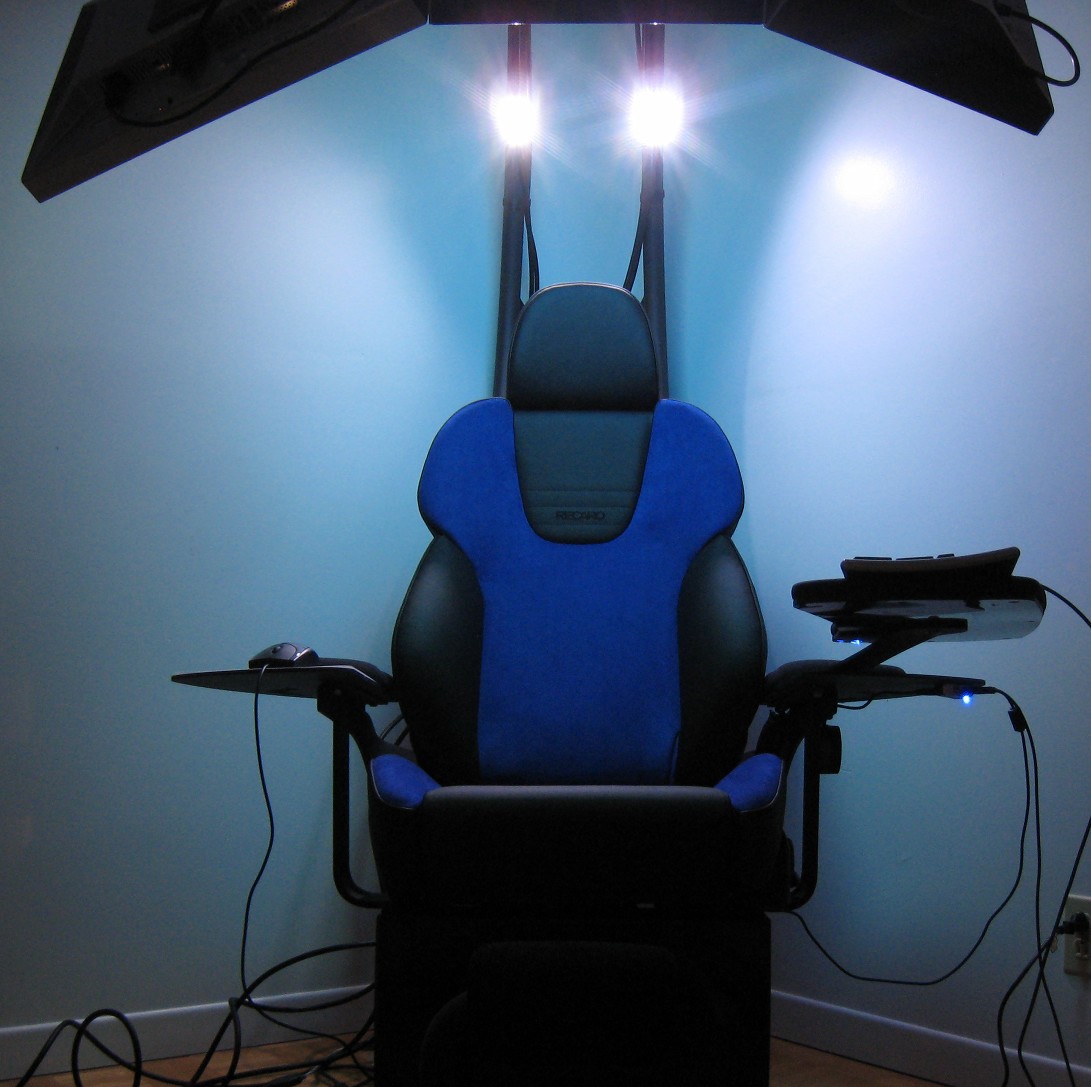
Here's the only full length review of the NovelQuest's Emperor 1510 chair as far as I know. Most of 1510 buyers are enterprises or institutions but this chair is also useful for professionals and the review is focused on that point of view. I had the chance to be an early adopter. I got this chair in December 2009 so this review is done after extensive use of the Emperor 1510 for more than 8 months. The chair I'm reviewing has these options:
  • British Charcoal
  • Recaro blue leather seat (see note below)
  • 2.1 Bose sound system
  • Custom monitor support, monitors weren't included
  • USB hub under the armrest
  • Blue LEDs package
  • 110 volts
Delivery
This chair is heavy and high. You're not buying cheap plastic here. It is almost 6' feet tall when "boxed". Most parts are screwed so it can be split into smaller pieces to move it in more confined spaces, it just takes much more time to disassemble and reassemble. The seat itself is removable but there are more than 20 screws to remove first. With flaps and monitors removed, the chair is 27" wide so it fits even smaller doors. It's on the heavy side, around 275lbs so you need to plan in advance for the move.

Weight and Size
Once unpacked, the chair fits low ceilings since it's merely 6'6" high. The main concern I had when it was delivered was that the bottom didn't have polyester padding, the type of padding you often see on Ikea furniture. I was afraid the wood floor would be scratched by the direct metal contact coupled to the sheer weight of the structure. After many months of use, I can say this is not an issue. As with any furniture, dust tends to accumulate under the chair so it needs to be moved to clean the floor properly.

There is 2 electrical cylinders on the seat. One to raise the arm holding the monitors and the other to tilt the whole chair. The control panel is on the left arm rest. The fifth control is for the LEDs.


Monitors
I have a custom configuration and was told it will be a unique item, so please don't try to order this configuration. The Emperor 1510 was replacing my desk of three 24" Dell 2407wfp and one 17" Dell 1707fp. I tried to have the old 17" monitor above the right-most 24" but that didn't work out so I just left the monitor on a table on the side of the chair. The main issue is weight asymmetry on the arm, causing it to oscillate significantly. So in the end, you want to have your monitor configuration to be symmetrical unlike mine. If you want to go with the Matrox TripleHead2Go you will be limited to three 1680 * 1050 monitors. The default 19" monitors setup is made of 1280*1024 monitors. Three HDMI -> DVI cables are now provided inside the tubes so you shouldn’t have to strap cables as I’ve done.

Monitor weight is also an issue. Dell 2407wfp's aren't on the light side and putting 50lbs of monitors on it is apparent since the arm speed had to be slowed down. Everything is as new after 6 months of use. Cheaper monitors are usually lighter so that may be a saner choice. Mine have CCLF backlight, newer LED backlight monitors may be lighter, check the specs first. If you can sustain the high dpi of a 30" monitor, it's probably the way to go since you have more pixels than three 19".

I own a nvidia Quadro NVS 450 but many options are available: use one of the triple output card from ATI, nvidia or Matrox or use two video cards. If you use a Matrox TripleHead2Go, the operating system thinks you have only one monitor so it has side effects like putting the taskbar across all monitors instead of only the one of your choice and you cannot rotate them. At the same time, configuration is easier and you can use cheaper video card since you don't need 3 separate outputs.

If you use your own monitor(s), be sure to have a VESA mount on them and to not have them be too deep. As a reference, a 2407wfp is the absolute maximum deepness you can have as I've lost all possibility to do vertical orientation alignment. I highly recommend using 16:10 monitors and not 16:9 ones. If you can, 4:3 or even 5:4 monitors definitely make sense.
This setup is perfect for doing code reviews, coding, monitoring build status and chatting on irc all at once

Sound
I am impressed by the Bose 2.1 sound system. I had really low expectation about it as I dislike 2.1 sound system in general. I prefer old style extended range speakers with dual tweeters and one woofer per speaker box. Pop and techno music reproduction on the Bose system is really good and I assume it'd be the same for gaming, you wouldn't want to have headphones on this chair. Since the subwoofer is confined under the chair, the bass level is really high. I had to reduce its level so I would be comfortable while working! Gamers may prefer the 5.1 to have better spacial reproduction to know where that grenade blast came from.

Gaming
If you have more than 4995$ to put in a chair, plus a powerful workstation and monitors, you probably have a professional life to pay these gadgets. This probably means you stopped gaming a long time ago as I did. I'd personally prefer to have a high dpi monitor like a 30" but some models tend to suffer input lag. If you want to have surround gaming, three 19" is the way to go, at the cost of having less precise snipper shots since the center monitor doesn’t have that many pixels. The only thing you want to make sure is to not have a low end video card.

For the video card, many options are available: ATI with Eyefinity, nvidia with 2D Surround or a Matrox TripleHead. You will want to use monitors that don't have LCD panel input delay, which means using the LCD in its native resolution when gaming or using the video card to do the scaling instead.

I was tempted to try the new nvidia surround and ATI Eyefinity gaming support. I’d be running 3600x1920 if I were to rotate the third monitor in portrait as I don’t think there’s any way to put 3x 1920x1200 monitors in landscape on the Emperor 1510. The 3600x1920 setup only slightly wider than a 16:9 configuration so it’s not “surround” in its truest sense but you still get significantly more pixels than a 30” monitor and a wider view than a 1920x1080. Great for these sniper shots. Both nvidia and ATI support portrait monitors. A (slightly crazy) colleague told me his ATI Radeon HD 5970 can drive three 30’ in most games fine enough so it should blast with three 24’. He now uses two HD 5970  in CrossFireX so most games can be played at max settings.

Seat
Since the seat is different from what you'll get, I won't make a full review of it here. In short this is a real racing car seat so it has many settings but not all of them are relevant like sides hardening. The Recaro is also a very firm seat. It's comfortable even at very high temperature, tested at 35°C without A/C on. When raising the seat, it also advances so it is a bit harder to find the sweet spot. If you can attend one of the trade show that NovelQuest presents, I'd recommend you to try the seat first to get an idea.

USB hub option and wireless
The USB hub is now a powered type so you should be able to charge your cellphone on it. Keep in mind this chair is a lot of metal so it acts as an antenna with regard to wireless devices. There is no issue with Wifi but there is with Bluetooth and wireless mice and keyboards since their emission power is relatively low. This means you'll need to keep the USB receiver near the device to have it working at all. Cabled devices don't have any issue except that I tend to drop them on the floor, I already broke one keyboard. So putting the receiver on the USB hub just below the armrest makes sense here.

The leg rest is now larger than this one
Ergonomy
The seat itself has a fair number of adjustment but not much for the chair. I have long arms and I'm the kind of guy to remove the armrest on all the chairs I've been using as they were always too high. The armrests on the Emperor are soldered and the seat is screwed on the metal base. I am also farsighted. So in my case, the seat was too close to the monitors and the armrest too high. It took my a while to convince myself to bring on the drill and to put new holes on the base metal frame to move the seat backwards about 2". This worked great and the seat is comfortable now. As for the keyboard holder, I don't use it for the same reason but for "normal" people it should fits well. The whole chair can lean back which makes it quite comfortable but you are limited by how much friction your mouse has since it will start gliding by itself. Gaming-style mice are much more affected by that since they usually glide more. You'll also notice I removed the right side arm padding to remove an additional 1" for my right arm, making mouse movement easier to reduce the likelihood of having carpal tunnel syndrome. The chair also has a leg rest which is helpful, the newer model is slightly larger than the one I have. The seat is also extensible.

Related to input devices, the USB hub’s placement is perfect for use with a Mac Pro’s keyboard. I’m specifically referring to the full length wired keyboard, not their small wireless one. I coupled this with a Logitech G3 “gaming mouse”. That’s what I’ve been using for a while and it gives me the best efficiency.

If you are left-handed or ambidextrous, you are out of luck. I used to switch the mouse to reduce CTS but I can’t anymore. It is a small issue I can live with.

Using a laptop in addition to the computer is slightly cumbersome. I do that occasionally but I try to not do that for extended period of time because of the awkward position. I use the keyboard holder to hold the laptop for light use.

The whole chair tilt to the point where the keyboard will fall on the ground by itself. It's great to just sit back and watch a movie, depending on your monitor setup. The pictures below may not look like it tilts a lot but it sure does.

Cabling
I bought three cheap dual-link DVI 25' cables at 30$ each plus USB cables. Look for 24 AWG cables if you choose this length, 28 AWG may not be of enough quality to push the signal at 1920x1200. Since my video card has display ports, I had to use the included passive DisplayPort -> single-link DVI adaptors which reduces the DVI signal strength. Having dual-link DVI cable still makes sense as it reduces internal cross-wire EMI. I strapped the USB and DVI cables on the arms with velcros. If you plan to do this, be sure to use black cables with black metal coating since if you choose the red metal frame option, the cables will be hard to hide. In the end, that works out very well and there is no video signal loss. I use a USB cable to plug my own webcam since I'm using a Logitech QuickCam Pro 9000. The one included by default wasn't high quality enough for videoconferencing. Note that now three video cables are passed inside the arm so it may be sufficient for you. It's also nicer to not have wires visible.

The chair has a power cable for a computer if you want to keep it on one of the flap but I chose to keep the computer in the wardrobe, literally. This explains the long cables since 15' cables are long enough to connect anything from the monitors to a computer on the side. Keeping the computer in the wardrobe make the whole look much cleaner.

Working in a team environment
One issue with this chair is that paired programming is not practical since the chair is designed for single person use and there isn't much place to let someone else look a the screens correctly. This is mainly because of the angle of each monitors. If only a single monitor is attached to the arm, the issue is much less important because there isn't monitor curvature.

Getting in and out
It is slower than a normal chair. It is even slower in my configuration because the arm had to be slowed down due to heavy monitor weight. At the beginning I was a little annoyed by that but I got used to this. The only complain I still have is that the arm's control still don't have an 'auto' mode like electric car windows for full up/down movement.


WOW factor and LED lighting
I have the base LED lighting with the LED packages. Once you've got monitors, computer and sound hooked up, you'll see the wow factor and you have to see it to understand what I mean. That works out pretty well with friends. The LEDs are not strictly useful but it increases the 'wow' effect significantly so it's a good option.

Conclusion
It is especially useful for home worker since it reduces the space your desk takes but it is not convenient for people managing even a small amount of paper. It's also smaller than a conventional cubicle so it's a space saver in offices. It definitely has the wow factor. If you put a large enough monitor, you don't need a personal cinema room. So in the end, if I have to buy it again, I'll do.

Even though I work for Google, I bought the chair on my own. No, Google doesn't have these, yet.

Copyright 2010 Marc-Antoine Ruel. All rights reserved. Reproduction can only be done with the consent of the author.


Edit 2012-11-06

I spent all my workdays in it for the past 2 years. The seating is really good and I can stay focused for many hours in a row. A setup of 3 monitors in portrait is hard to beat for a programmer, and the immersion is really good, I totally forget what's around me.

Note that my chair has a standard Recaro Topline seat which is now discontinued. This is a car seat so that's why it looks a bit tick on the pictures, it is tick. I don't know which seat is used in the new revision. It seems a bit thinner but that shouldn't change anything comfort-wise, you are not in a car after all. If seating concerns you, I'd recommend to inquire the company directly or better, visit one of the trade show where they present the chair so you can try it yourself. The chair itself is now sold by MWE Lab (mwelab.com). They are nice guys and they list the trade shows where you can try it. That's how I made the first contact.

The overall structure doesn't seem to have changed much and I can vouch for the solidity of the steel structure, even if using professional 24" monitors is a tad on the heavy side of what it can support. Using consumer grade LED 24" monitors should be fine. I replaced my Dell 2407wfp with Lenovo 4420MB2 (which feels like paperweight compared to the Dells) and it went fine even if the spacing are not exactly the same.

The new revision of the chair now has a proper laptop holder which I do not have. So I use the keyboard holder as a laptop holder. It seems to have a fair number of small improvements like the sound knob and the power buttons are better placed. It now has a proper cup holder. And the overall look is a bit more polished too. So I think the new revision is worth trying out.